Read: ~7 min · Apply: in the Building Your Template from Your Voice Profile product video
By this point, many teachers have seen both sides of AI feedback.
On one hand, it's fast. It can generate detailed comments in seconds.
On the other hand, it often doesn't quite sound right—or doesn't quite do what you want.
That's because generating feedback is not the hard part. Getting feedback that is clear, consistent, and actually useful for students is.
The hidden challenge behind AI feedback
Most AI tools rely on a simple idea: You write a prompt → the AI generates feedback.
In theory, that sounds flexible. In practice, it creates a problem.
To get consistently good results, you would need to:
- write very specific instructions
- control tone, structure, and level of detail
- anticipate how the AI will respond
In other words, you would need to do a form of prompt engineering.
But that's not how teachers naturally think.
Teachers think in terms of:
- "Be encouraging but honest"
- "Focus on the most important issue"
- "Use the rubric language"
- "Keep it clear for this age group"
Translating that into precise AI instructions is where things often break down.
From prompts to templates
Instead of writing a new prompt every time, TA39 uses feedback templates.
A template is simply: a reusable set of instructions that tells the AI how to generate feedback.
It controls things like:
- tone and voice
- level of detail
- structure of the response
- how student work is referenced
- how improvement is framed
When a template is well designed, the feedback starts to feel like something you would have written yourself.
When it isn't, the feedback becomes generic, inconsistent, or difficult for students to use.
How templates connect to feedback structure
The companion article Why Good Feedback Still Doesn't Improve Student Work introduces five feedback structures: feed-forward, criterion-focused, SBI, task–process–self-regulation, and sandwich. If you have not read it yet, do that first — the structure you choose there is one of the inputs you bring into the template.
A feedback template is how you bring one of those structures into practice consistently.
For example:
- A revision-focused template will often use a feed-forward structure
- A grading template will align with criterion-focused feedback
- A precision-focused template may use SBI
- A deeper-learning template may include task, process, and self-regulation prompts
You don't need to think in terms of theory when building a template.
But in practice, you are making the same decision: What kind of feedback do I want students to receive—and why?
The template simply ensures that this happens consistently.
Why templates matter
The quality of feedback isn't just about wording. It's about structure and consistency.
Well-designed templates do something important:
- they prevent ineffective feedback from being generated in the first place
- they ensure feedback points to specific evidence
- they keep the focus on a small number of priorities
- they make next steps explicit
In other words, they don't just make feedback sound better. They make feedback work better.
They also reduce variation. Instead of starting from scratch each time, you are working from a consistent foundation—while still keeping space for teacher judgment.
A shift in thinking
Instead of asking: "What should the AI write?"
You are now asking: What kind of feedback do I want students to receive—and how should it be structured?
That's a different level of control.
How to build your own feedback template
The good news is that you don't need to start from a blank page.
Most teachers already know what useful feedback sounds like. The challenge is turning that judgment into something the AI can follow consistently.
That's what the Feedback Template Builder is designed to support.
Step 1: Start with a strong starting point
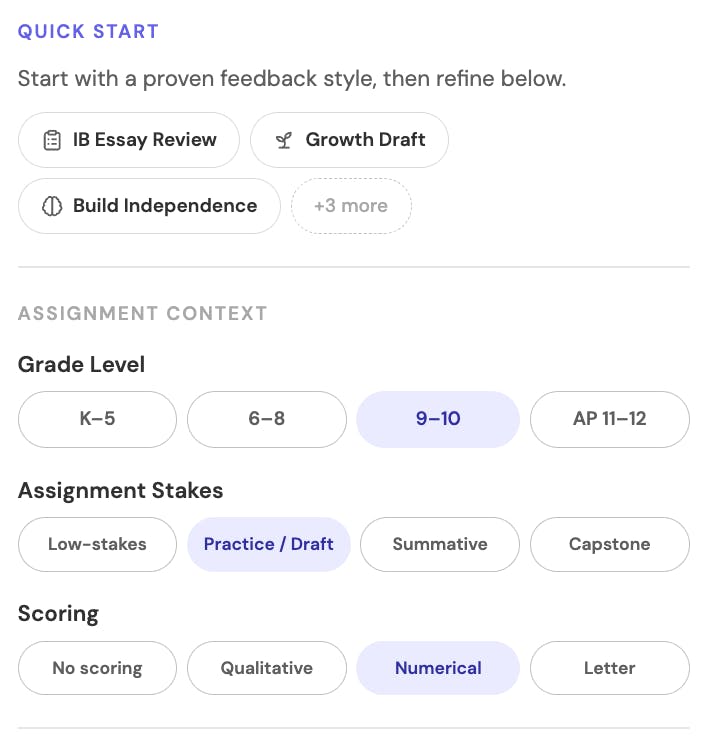
When you open the builder, you'll see a range of presets. These are not rigid templates—they are useful starting points.
Each preset reflects a different feedback goal.
For example:
- revision-focused → Revision Guide
- rubric-based → Rubric Audit
- younger students → Warm & Encouraging
- quick feedback → Quick Check
You're not committing to a final version yet. You're just choosing a place to begin.
Step 2: Adjust the key decisions
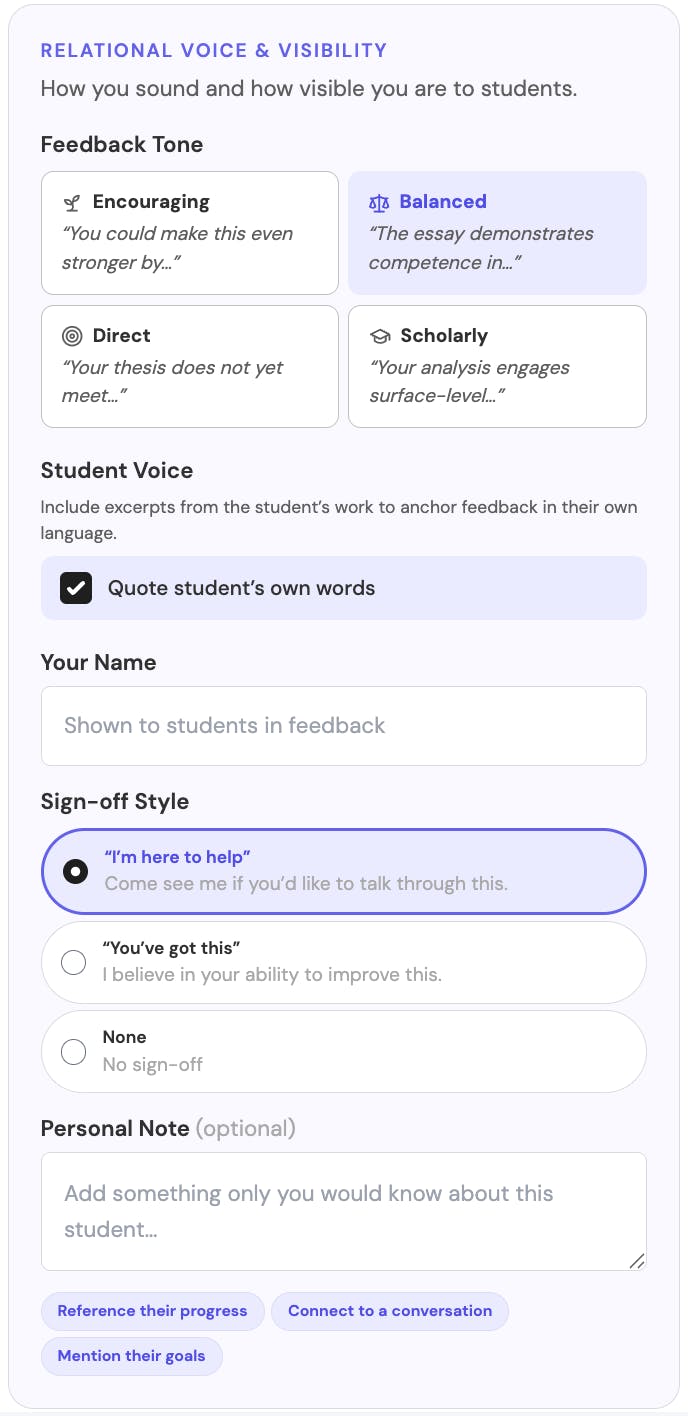
From there, the builder asks a few simple questions:
- Who are your students?
- How should the feedback sound?
- How much detail do you want?
- Should scores be included?
- What sections should appear?
These are not technical settings. They are teaching decisions.
As you adjust them, the template updates in real time. You'll start to notice:
- more detail usually creates more structure
- tone changes how feedback is phrased
- sections shape what students actually see
Making these decisions explicitly helps create feedback that is more intentional and consistent.
Step 3: Add your personal touch
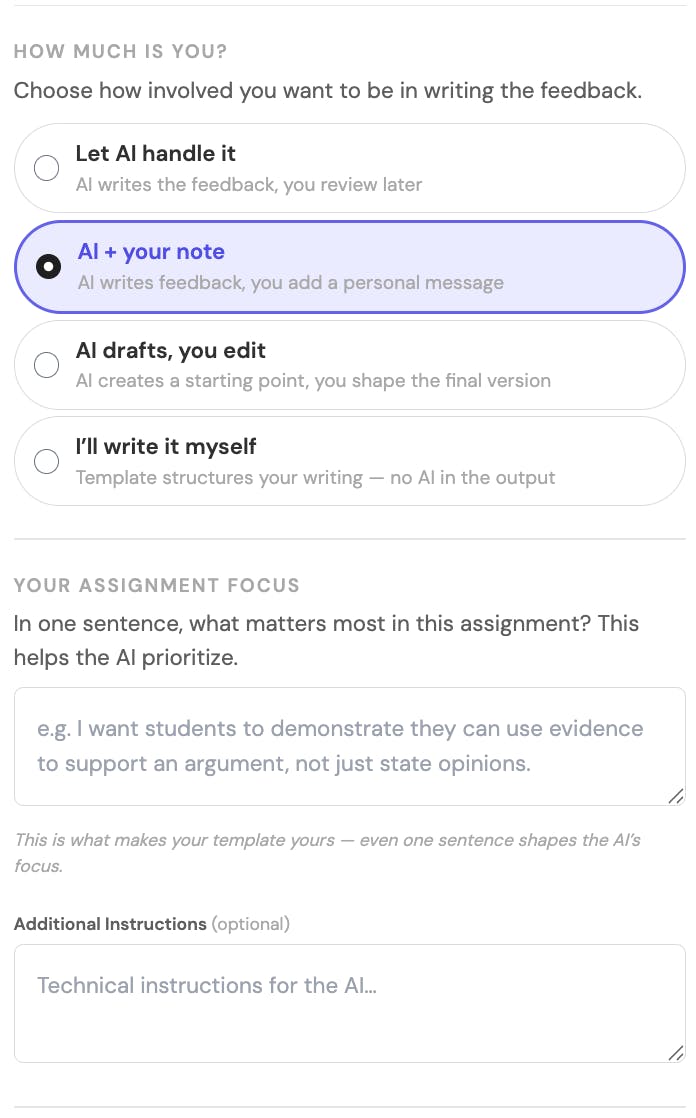
This is where your own voice becomes more visible — and where the Voice Profile exercise from Presenting Your Voice in Feedback pays off directly.
That guide walks through identifying the patterns that already shape how you give feedback: characteristic openings, the way you frame growth areas, the phrases you use to close. The Voice Profile exercise turns those patterns into something concrete enough to bring into the template. This article does not duplicate that work; it picks up where the Voice Profile leaves off.
Alongside the voice patterns, you can add short instructions in your own words, such as:
- "Focus on 2 key improvements only"
- "Reference our class discussions where relevant"
- "Keep feedback encouraging but specific"
You don't need to phrase this technically. Just write it the way you would say it.
These choices shape how the feedback feels — and how students respond to it.
Step 4: Decide how much is AI, and how much is you
One of the most useful questions is also one of the most practical: How much do you want the AI to do?
Some teachers:
- use AI to draft most of the feedback and then review it
- guide it more closely with detailed instructions
- use it mainly for structure, while keeping a stronger personal voice
There's no single right answer. What matters is that the decision is visible.
A common mistake is trying to include too much. Strong templates usually focus on a small number of priorities, rather than covering everything.
Step 5: Look at the template
At this point, you'll see the full template—the actual instructions being sent to the AI.
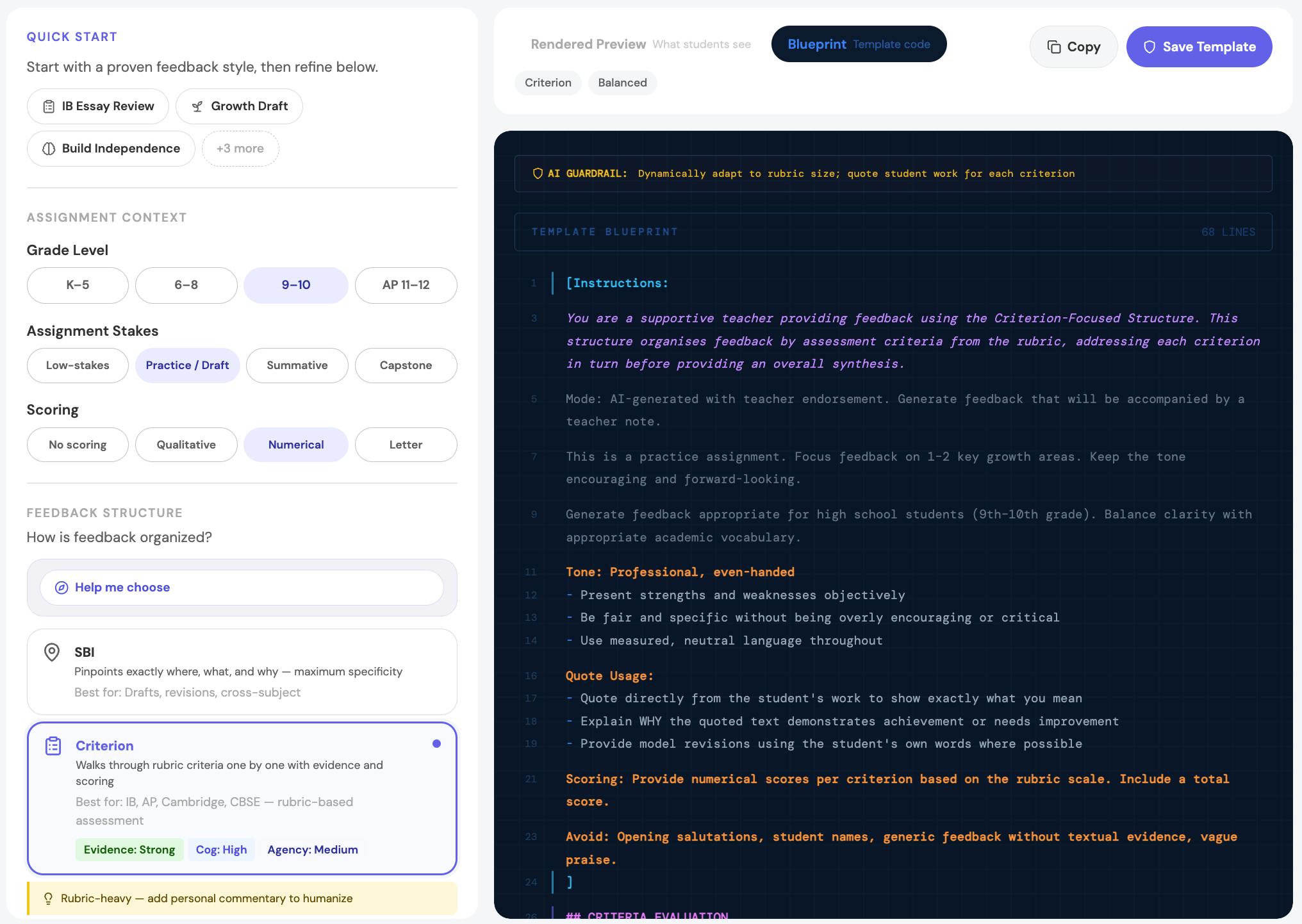
You don't need to edit it yet. Just scan it.
Over time, many teachers begin to notice patterns:
- how tone is expressed
- how structure is built
- how instructions shape the output
The system becomes more transparent and easier to control.
Step 6: Preview what students will see
A template can look good in theory but produce feedback that feels too broad or too generic.
Before saving, preview the output.
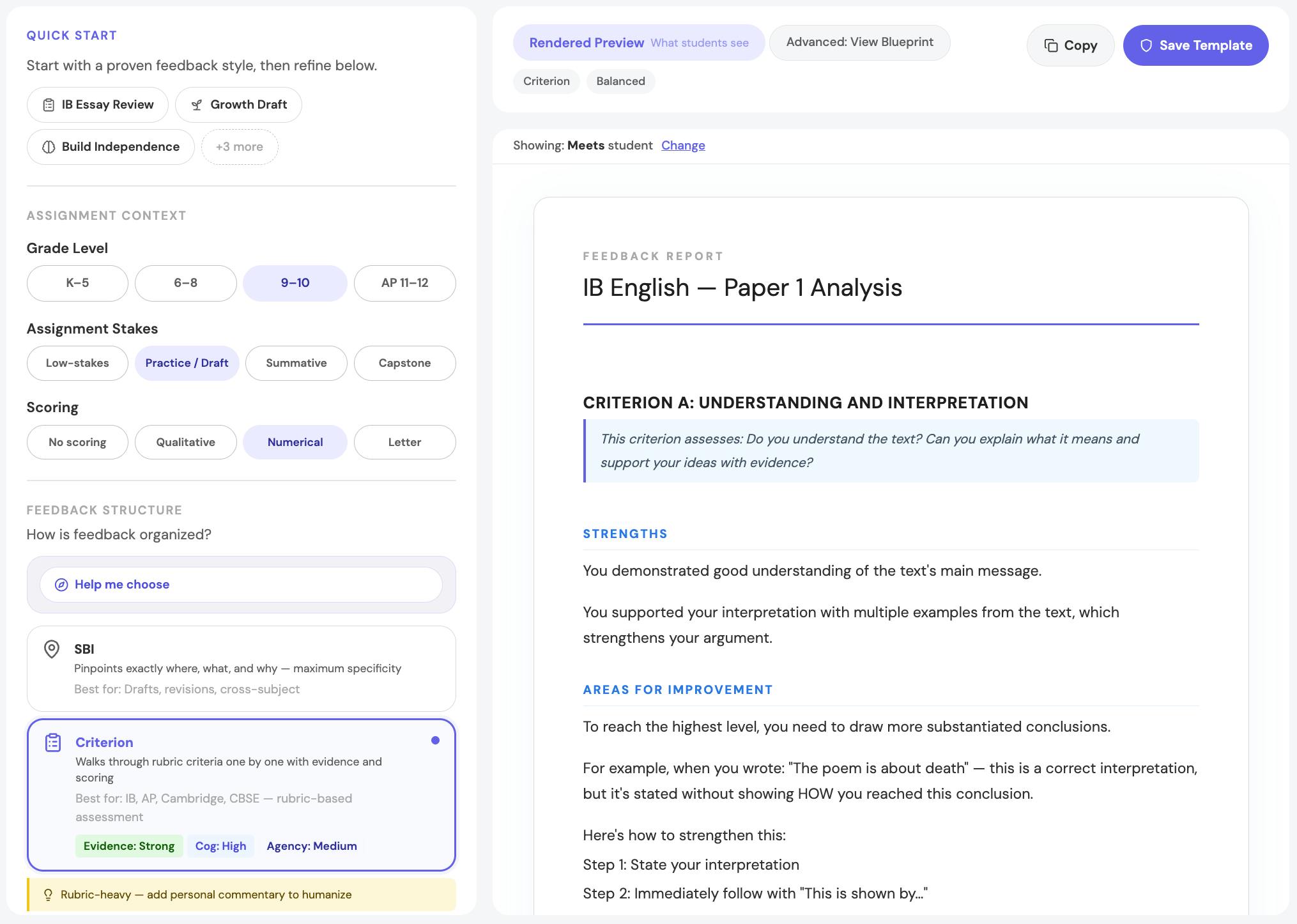
This helps you check:
- whether the tone feels right
- whether the level of detail is appropriate
- whether the feedback is actually usable
This step often reveals more than rereading the template itself.
Step 7: Save and refine over time
Once the template feels right, save it with a clear name:
- "Year 10 English – Essays"
- "IB – Formative Writing"
- "Quick Homework Feedback"
From there, you can reuse and refine it.
Your first version doesn't need to be perfect. Most teachers improve templates over time by:
- seeing how students respond
- adjusting the level of detail
- tightening the focus
A simple check
After using your template, ask: If a student reads this, will they know exactly what to do next?
If the answer is unclear:
- reduce the number of points
- make actions more explicit
- focus on one or two priorities
That one question improves most templates.
Where teachers still matter most
Even with strong templates, teacher judgment remains essential.
Templates can structure feedback. But they don't replace:
- your knowledge of the class
- your understanding of student misconceptions
- your sense of what each student needs next
The most effective approach is:
- the template provides a strong starting point
- the teacher adds context, precision, and judgment
Bringing it together
Across all of this, the idea is consistent:
- feedback works when students can act on it
- structure makes feedback usable
- templates make that structure consistent
The goal is not to control every word the AI writes. It is to ensure that the feedback students receive is: focused, structured, and easy to act on.
What comes next
The three Module B readings — Presenting Your Voice in Feedback, Why Good Feedback Still Doesn't Improve Student Work, and this article — feed into the same product step: building a feedback template that carries your voice, applies a structure that fits the assignment, and reflects the template principles above.
You will bring three inputs into the Template Builder:
- Voice Profile — the patterns surfaced by the voice guide's exercise
- Feedback Structure — the structure you chose at the end of Why Good Feedback Still Doesn't Improve Student Work
- Template Principles — specific evidence, limited priorities, usable next steps
The product video Building Your Template from Your Voice Profile shows how those three inputs translate into the builder. If you've completed the exercises in the two companion articles, that step takes about five minutes. You already know your voice, your structure, and your template principles. The video shows where each one lands inside the tool.