If you already have a rubric, you no longer need to rebuild it from scratch before using it in TA39.
You can now upload a rubric from a PDF, document, table, or text-based file and let TA39 extract, structure, and improve it inside the platform.
This is an important change. Previously, teachers often had to clean up a rubric separately before TA39 could use it well. Now, that work is built into the rubric workflow itself. After upload, you can review the extracted rubric, use Optimize with AI to strengthen it, compare the original and revised versions, and save the result to your rubric library.
That makes rubric setup more practical, especially when you are starting from a rubric you already use with students.
Clear structure still matters. The clearer your original rubric is, the easier it is for TA39 to interpret it accurately, and the more useful its suggestions will be.
This guide explains what helps, what to review after upload, and how to use Optimize with AI well.
Start with the rubric you already have
Most teachers are not writing a brand-new rubric every time. More often, you are starting from something that already exists: a department rubric, a rubric from a previous term, a shared team document, or a scoring table in a PDF.
TA39 is designed to work with that.
Instead of asking you to prepare a rubric in a separate tool first, TA39 now lets you bring that rubric directly into the platform and improve it as part of the normal setup process.
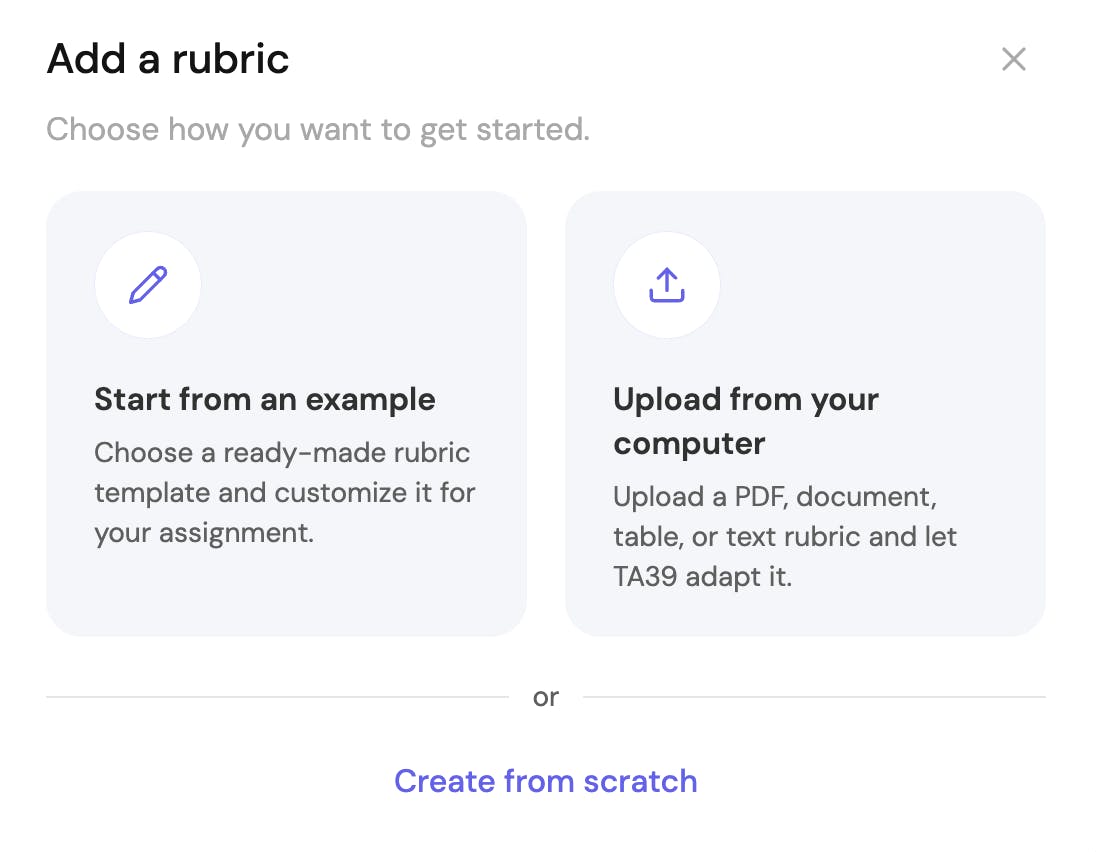
TA39 now lets you start with the rubric you already have, whether you want to upload one, use an example, or create one from scratch.
Upload, review, and optimize in one flow
This is the biggest workflow change.
TA39 used to rely more heavily on a separate rubric-conversion step. Now, that process is part of the rubric setup experience itself.
Instead of preparing a rubric elsewhere and then bringing it into TA39, you can now:
- upload the rubric you already have
- review the extracted version
- use Optimize with AI to improve clarity and consistency
- compare the original and revised versions
- save the rubric for use in TA39
That is a better fit for how teachers actually work. Most teachers are not looking for a separate “converter.” They are trying to get an existing rubric into a form that is clear, usable, and ready for grading.
That is what Optimize with AI is for.
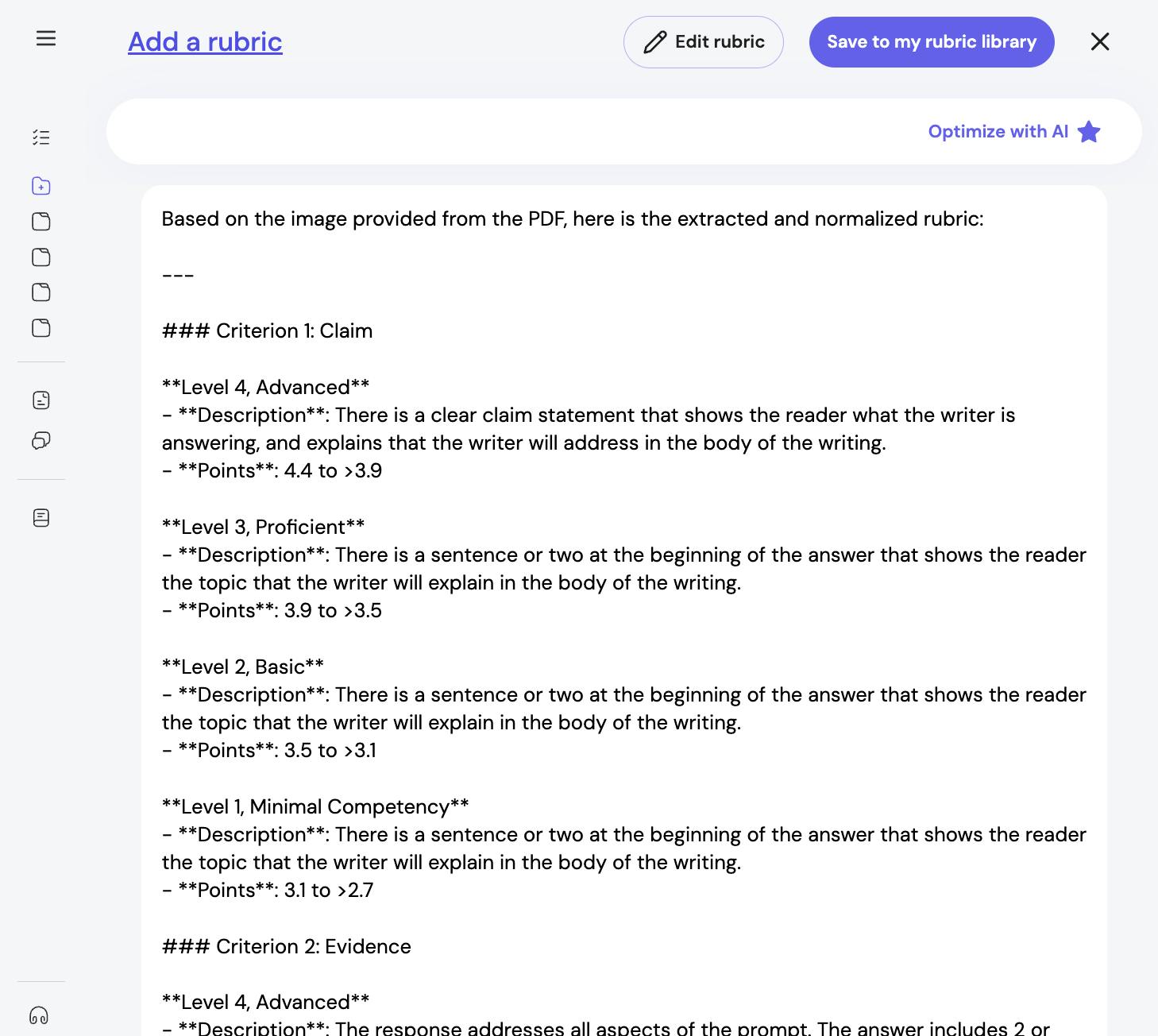
After upload, TA39 extracts and structures your rubric so you can review it before making changes.
What “Optimize with AI” is for
Optimize with AI is designed for a common situation: you already have a rubric that is mostly usable, but it is not yet as clear or consistent as it could be.
After upload, TA39 can help identify places where the rubric may need revision. For example, it may flag:
- performance levels that sound too similar
- score bands that are hard to interpret
- criteria that are present, but not clearly differentiated across levels
- wording that is technically correct, but difficult to apply consistently
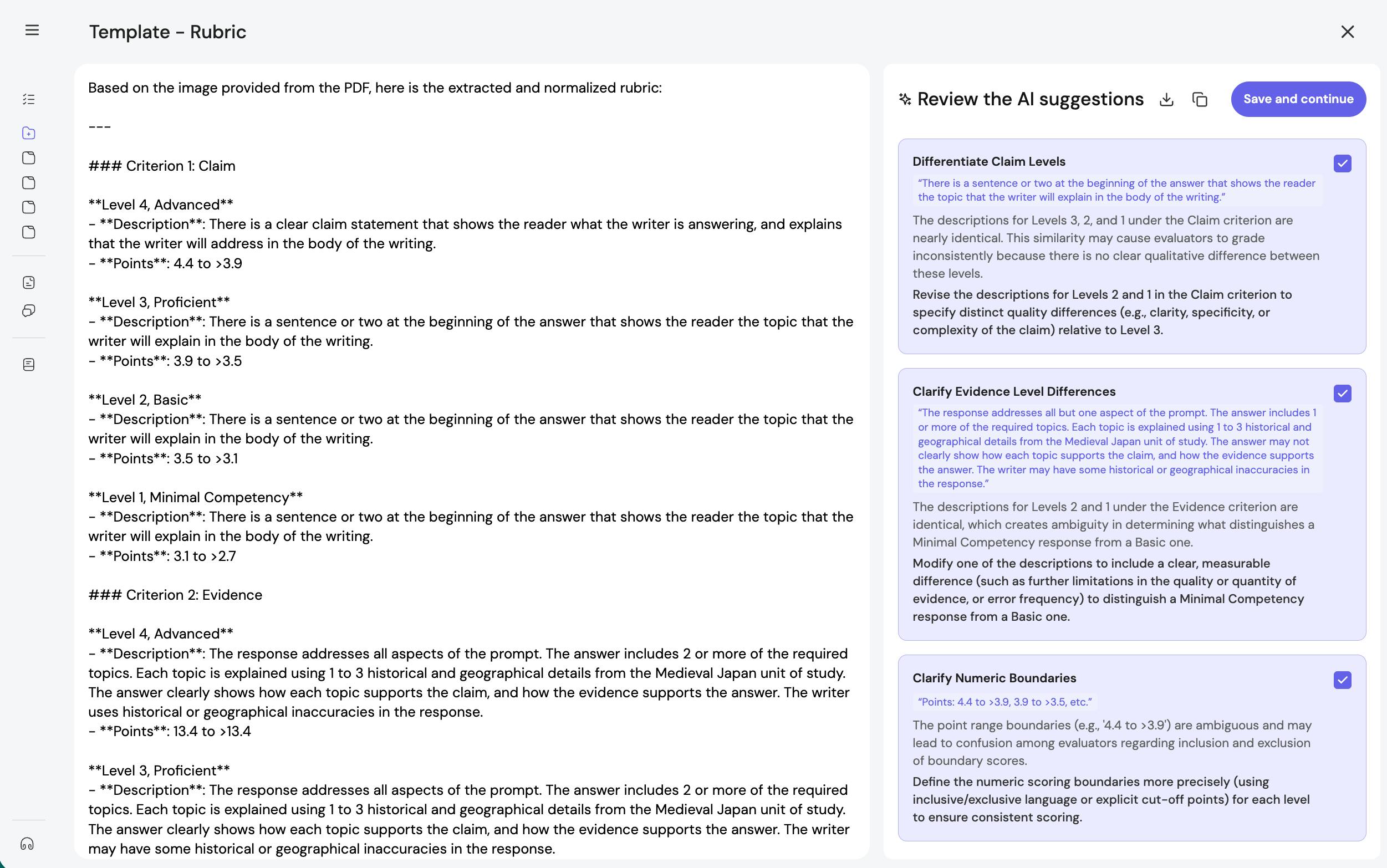
This is what now replaces much of the old need for a separate rubric-conversion utility.
The goal is not just to clean up formatting. The goal is to turn an existing rubric into one that is easier to interpret, easier to apply fairly, and easier to use inside TA39.
In practice, the workflow looks like this:
- upload the rubric you already have
- review the extracted version
- use Optimize with AI to generate suggested improvements
- compare the original and revised versions
- decide what you want to keep before saving
That review step matters. Optimize with AI is most useful when treated as a guided revision pass, not as an automatic final decision.
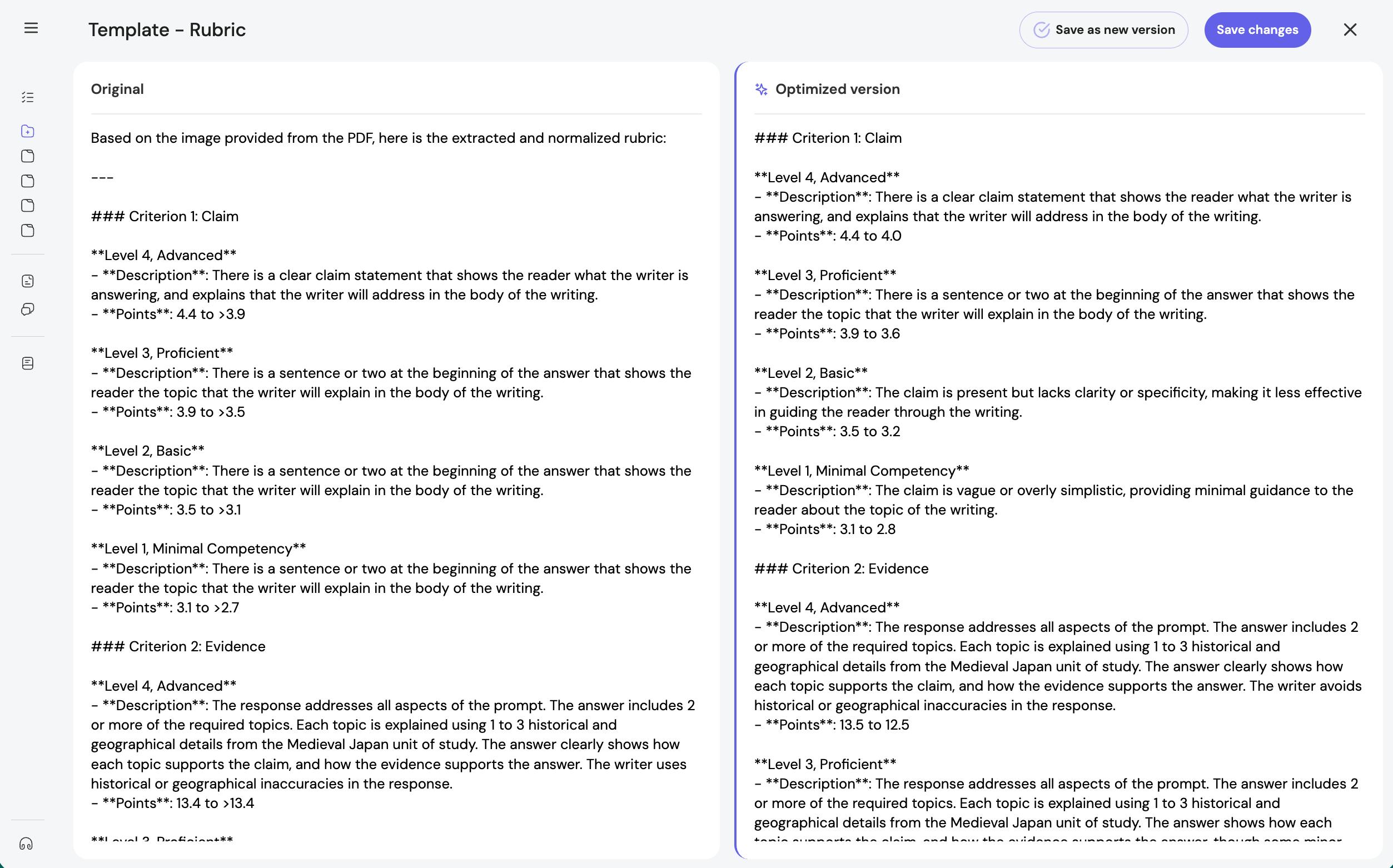
Optimize with AI helps identify unclear distinctions, improve consistency, and strengthen a rubric before you save it.
What helps TA39 interpret a rubric well
TA39 does not need a perfect rubric. It does need one with a structure it can follow.
Here is what usually helps.
Clear criteria names
Each criterion should be easy to identify as its own category of performance.
For example:
- Claim
- Evidence
- Organization
- Use of sources
This is easier to interpret than a rubric where criteria are buried in long paragraphs or mixed together without clear labels.
Distinct performance levels
The rubric should make it clear how performance changes from one level to the next.
For example:
- Advanced
- Proficient
- Developing
- Beginning
or:
- Exceeds expectations
- Meets expectations
- Approaches expectations
- Not yet meeting expectations
A rubric becomes harder to use when levels are implied but not labeled, or when the difference between levels is too slight to be useful in practice.
Consistent scoring information
If you use points, point bands, or score ranges, keep them consistent across the rubric.
For example:
- 4 points / 3 points / 2 points / 1 point
- 4.4 to 4.0 / 3.9 to 3.5 / 3.4 to 3.0
The exact scoring system matters less than clarity. Teachers should be able to tell quickly how scores connect to levels.
One main idea per cell or description
Rubrics are easier to extract when each description mainly corresponds to one criterion and one level.
They become harder to interpret when one cell or paragraph tries to do too much at once, especially if it mixes:
- multiple criteria
- scoring notes
- teacher reminders
- exceptions or special rules
If your original rubric is complex, TA39 may still work with it. But a simpler structure usually leads to a cleaner result.
A readable layout
Tables are often easiest to interpret, but TA39 can also work from text-based rubrics and uploaded documents.
You do not need to redesign a rubric just for the platform. But if the original file includes heavily merged cells, repeated headings, or formatting that makes rows and columns hard to distinguish, review the result carefully after upload.
You do not need a perfect file before uploading
You no longer need to clean up every formatting detail before you begin.
That is one of the main improvements in the current workflow.
You can upload:
- a PDF rubric
- a document with rubric text
- a table-based rubric
- a rubric copied from an existing source
TA39 can then extract and structure that rubric into a format you can review and improve.
That means these guidelines are no longer about meeting a strict requirement before you start. They are about helping you get a cleaner result and making Optimize with AI more useful once the rubric is inside TA39.
What to review after upload
Once TA39 has extracted your rubric, review it as a teacher, not just as a proofreader.
The question is not only whether the text was captured correctly. The more important question is whether the rubric still works as a fair, usable tool for evaluation.
Here are the main things to check.
Are all criteria present and correctly labeled?
Make sure no criterion was merged with another, dropped, or mislabeled during extraction.
This matters especially when the original rubric relied on visual formatting rather than explicit headings.
Are the performance levels complete and in the right order?
Check that each criterion includes the full set of levels you intended to use, and that the labels still mean what you want them to mean.
Do the level descriptions actually distinguish performance?
A rubric is harder to use well when adjacent levels sound almost the same.
For example, if two levels both say that a student “addresses the prompt” but do not explain what improves from one level to the next, scorers may interpret them differently. TA39 may flag issues like this during optimization, but the final judgment still belongs to you.
For a closer look at this part of rubric quality, see From good enough to clear and fair: upgrading rubrics for AI support.
Are the score ranges easy to interpret?
If your rubric uses point bands, make sure the boundaries are clear.
For example, a range such as “4.4 to >3.9” may be technically understandable, but still awkward to use while scoring. Teachers should not have to stop and decode a boundary in the middle of evaluation.
Did any wording lose meaning in extraction?
Sometimes the wording is technically present but less clear once it has been moved into a structured format. Check for missing qualifiers, flattened distinctions, or places where a sentence now sounds broader or narrower than you intended.
Does the rubric still match the assignment?
This is the most important review step.
A rubric can be well structured and still be poorly aligned to the task students are actually completing. Before saving, make sure the rubric reflects the knowledge, skills, and evidence the assignment is meant to assess.
Make sure your rubric and feedback template work together
Rubrics and feedback templates do related but different jobs.
The rubric defines what is being assessed. The feedback template shapes how that assessment is communicated. If the two are out of sync, the result can be confusing or less useful than intended.
For example, a rubric may use qualitative levels such as “Meeting expectations” and “Exceeding expectations,” while a feedback template asks for numeric scores for each criterion and a total score at the end. In some cases, that mismatch can make the output less clear for you or for students.
Before using a rubric and template together, check that they support the same grading approach.
They do not need to match word for word. They do need to work in the same direction.
Save rubrics you may want to use again
Once you have a rubric that works well, save it to your rubric library.
This saves time and supports consistency. You do not need to rebuild or re-upload a strong rubric each time you teach a similar assignment, and you can keep expectations more stable across sections, terms, or assignment versions.
You can always adjust a saved rubric for a new task. But starting from a strong version is often more useful than starting over.
A practical standard to aim for
You do not need a perfectly formatted rubric to get started in TA39.
You do need a rubric with enough structure that:
- the criteria are identifiable
- the levels are meaningful
- the scoring approach is understandable
- the final result can be reviewed and used with confidence
That is the standard worth aiming for.
TA39 can help you work from the rubric you already have. Optimize with AI helps you improve it. Clear structure simply helps you get to a stronger result more quickly.
Key takeaways
- You can now upload an existing rubric instead of rebuilding it from scratch.
- TA39 no longer depends on a separate rubric-conversion workflow for many common cases.
- Optimize with AI helps improve clarity, consistency, and usability after upload.
- Review the result carefully, especially criteria, levels, score ranges, and alignment to the assignment.
- Make sure your rubric and feedback template support the same grading approach.
- Save strong rubrics to your library so you can reuse and adapt them later.
Explore examples and keep refining
If you are unsure what a well-structured rubric looks like in practice, it can help to review sample rubrics and compare different approaches to criteria, levels, and scoring.
You do not need a perfect rubric on the first pass. In many cases, the best approach is to start with the rubric you already use, review the extracted version carefully, use Optimize with AI where it helps, and strengthen the parts that need clearer distinctions.
Need more help?
If you are not getting the result you expected, it is worth checking the rubric structure, the feedback template, and the assignment alignment before assuming something went wrong.
And if you need help, the TA39 team can support you as you refine the setup.